Private worker usage»
If your contract includes a private worker limit, Spacelift measures your usage against that limit continuously and shows you where you stand in the current billing cycle. This page explains what those numbers mean, how they are calculated, and how you can be told when you are running into your limit.
Info
Contracted worker limits come with a negotiated contract. On a self-service subscription the worker count included in your tier is listed on the pricing page rather than enforced, and additional usage is billed instead. Your usage chart still shows the trend in that case, but there is no limit to measure it against and the notifications described here do not apply.
The usage chart»
The chart lives in Organization settings → Usage, on the Workers tab. It opens on the current billing cycle. To look back at an earlier cycle, pick it from the period selector next to Export CSV. Past cycles are marked as complete, so their figures are final. The selector only shows up once there is more than one cycle to choose from.
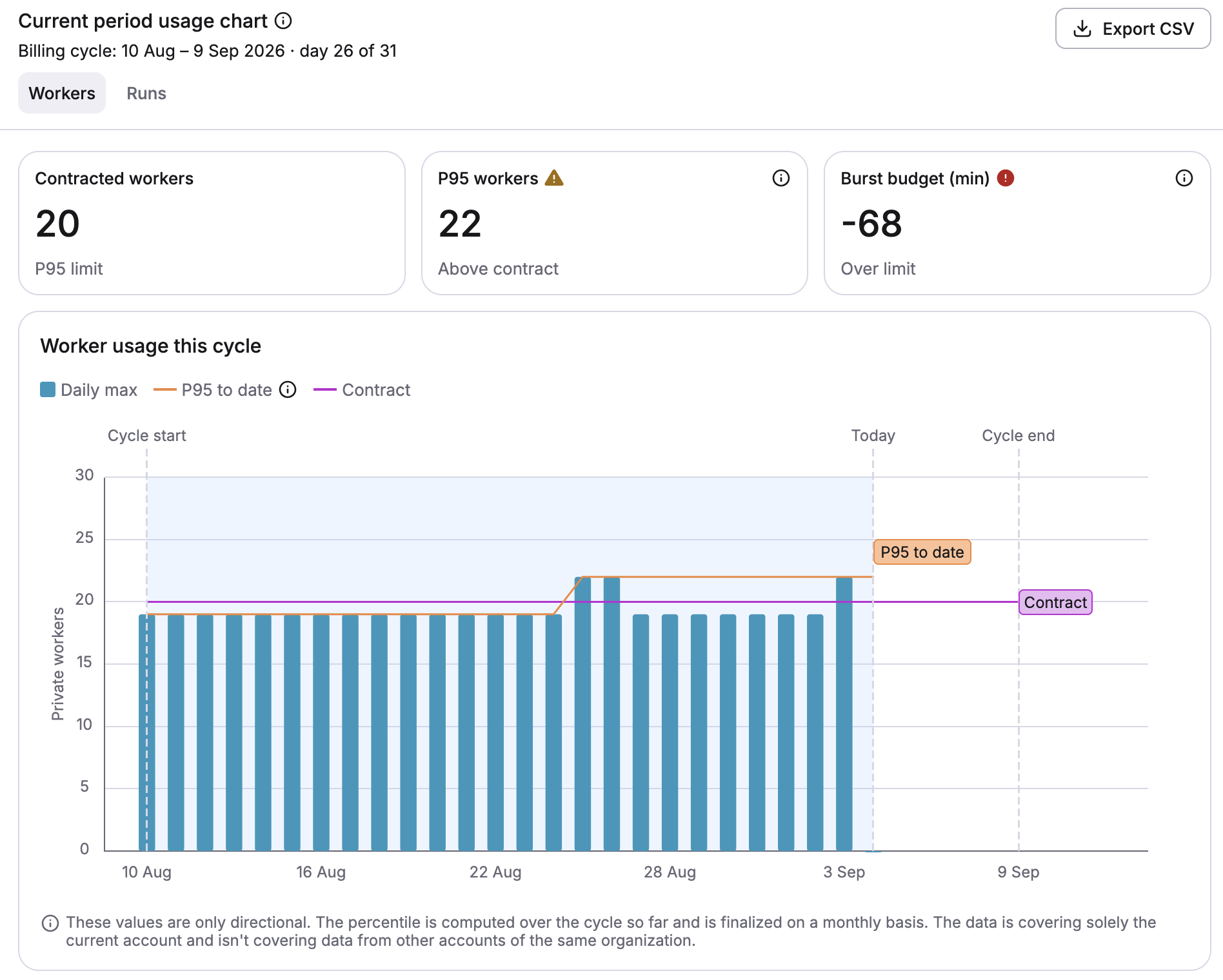
The percentile in these labels comes from your contract. The example above is a contract billed at P95; if yours bills at a different percentile, the labels and the figures behind them follow it.
Some Spacelift users have contracts that allow for multiple separate accounts/instances, all sharing one maximum number of workers. For instance, if 10 total workers are allowed by contract, that's 10 across all of the contracted accounts concurrently, not 10 per account. If your workers are part of a shared private worker pool between multiple accounts, overages and the burst budget cannot be calculated within Spacelift and will not be displayed. For usage data, contact your Customer Success Manager.
Three figures summarize the cycle:
| Figure | What it means |
|---|---|
| Contracted workers | The private worker limit in your contract, and the percentile it is measured at. |
| P95 workers | Your billed concurrency so far this cycle: the number of private workers you were at or below for 95% of the cycle's minutes. Named after your contracted percentile, so a P90 contract shows P90 workers. |
| Burst budget (min) | How many minutes you may spend above the contracted limit, less what you have already spent. A negative value means you have spent more than the contract allows. |
The chart below them breaks the cycle down by day:
- Daily max: The highest number of private workers connected on that day.
- P95 to date: The billed figure recalculated at the end of each day, so you can see which direction it is moving.
- Contract: Your contracted limit, drawn as a flat line to compare against.
Info
These values are directional. The percentile is computed over the cycle so far and is only finalized at the end of it, so the billed figure can still move. The chart also covers the current account alone, not other accounts belonging to the same organization.
You can export the same underlying data as CSV. See Usage for the export options and for how to load the data into PostgreSQL or Kibana.
How usage is measured»
Spacelift records how many distinct private workers are connected to your account each minute. Everything on the chart derives from that per-minute series.
Idle minutes count as zero: A minute with no workers connected is counted as zero workers, not skipped. This matters for the percentile: dropping idle minutes instead of counting them would push the billed figure up. It is also why a percentile you calculate yourself from the CSV export will not match the chart, since the export omits zero rows.
The billed figure is a percentile, not a maximum: Your billed concurrency is the worker count you were at or below for your contracted percentage of the cycle's minutes, which is 95% of them on a P95 contract. A short spike does not set your billed number; sustained concurrency does.
Billing cycles are anchored on your contract start date: A contract starting on the 10th runs cycles from the 10th of one month to the 9th of the next, in UTC. Cycles are always recomputed from the original start date, so they do not drift, and a start date late in the month is clamped to the last day of shorter months.
Your burst budget is whatever the percentile leaves over: Billing at P95 leaves 5% of the cycle's minutes free to exceed the contracted limit, and billing at P90 would leave 10%. Over a 31-day cycle at P95 that is 44,640 minutes × 5%, or 2,232 minutes of burst. A contract billed at P100 leaves no budget at all, so every minute above the limit is billable. Every minute spent above the contracted worker count draws the budget down. The budget covers the whole cycle, while the minutes spent count only the part elapsed so far.
Figures run through the previous midnight: All calculations stop at the last UTC midnight, so the most recent full day they cover is yesterday. Today's usage appears in the daily maximum but is not yet part of the billed figure.
Per-minute data is retained for six months, so you can compare previous billing cycles using the period selector above the chart.
Overage notifications»
Rather than waiting for an invoice, you can be told mid-cycle when your usage is running into your contract. There are two independent routes, notification policy and email, and they behave differently.
Use a notification policy as your primary route: You control where it goes, and it works the same on SaaS and Self-hosted. The email below is a backstop for administrators who aren't logged in. It is best-effort, and several of the conditions it depends on fail quietly.
Info
Neither route is real-time monitoring. Your usage is assessed once a day, against figures that stop at the previous midnight UTC, so a spike can be up to a day and a half old before it reaches you. When you need the current picture, check the usage chart.
Notification policy»
Once your usage reaches 60% of either your contracted limit or your burst budget, Spacelift
produces a WORKER_USAGE notification each day carrying the cycle's figures. Where it goes, if
anywhere, is up to you: a notification policy can
route it to the notification inbox, Slack, or a webhook.
An account with no notification policy receives nothing through this route, since the usage chart already shows the same figures to anyone who looks.
The policy input exposes the figures under input.worker_usage, including contracted_limit,
contracted_percentile, concurrency_at_contracted_percentile, burst_budget_minutes,
burst_used_minutes, burst_remaining_minutes and burst_ratio, along with the previous day's
values so a policy can fire on a change rather than every day.
This route is available on both SaaS and Self-hosted. The examples below all fire once the burst budget is 80% spent; adjust or drop that condition to suit.
Inbox»
The simplest policy reuses the title, body and severity Spacelift already computed:
1 2 3 4 5 6 7 8 9 10 11 | |
1 2 3 4 5 6 7 8 9 10 11 | |
Slack»
Because every figure is on the input, you can compose a message that says exactly where the cycle stands rather than sending the default text:
1 2 3 4 5 6 7 8 9 10 11 12 13 | |
1 2 3 4 5 6 7 8 9 10 11 12 13 | |
Tip
Escalate rather than repeat by giving each threshold its own rule: keep the message above for usage.burst_ratio >= 0.8, and add a second rule for usage.burst_ratio >= 1 that posts to a different channel or mentions your platform group. See Slack messages for mentions and threading.
Webhook»
Sending the figures as a custom payload lets your own monitoring pick them up and alert on them alongside everything else you watch:
1 2 3 4 5 6 7 8 9 10 11 12 13 14 15 16 17 18 19 20 21 22 23 24 25 26 | |
1 2 3 4 5 6 7 8 9 10 11 12 13 14 15 16 17 18 19 20 21 22 23 24 25 26 | |
cycle_start and cycle_end are Unix timestamps. endpoint.id is the slug of a named webhook you have already created, so the rule matches nothing if no endpoint with that slug exists.
Email»
Spacelift also emails your administrators when your burst budget crosses 80%, and again when it reaches 100%. Unlike the notification policy route, this is not something you opt into, but it is best-effort and comes with some limitations. Treat the usage chart as the authoritative figure, and set up a notification policy if you need alerting you can rely on.
It follows the burst budget, not your worker count: Exceeding your contracted worker limit does not by itself trigger an email. Spending 80% of your allowed minutes above that limit does.
It is sent on crossing a threshold, not while you remain over one: Each threshold mails once, so you can expect at most two of these emails in a billing cycle. Staying over your limit for a further three weeks does not produce further emails.
Only accounts using Identity Access Management receive it: Accounts using a login policy get nothing through this route, because a login policy does not maintain the list of users the email needs.
Recipients are your root space administrators: A user qualifies as one by being the account owner, by holding a role on the root space that grants space admin, or by belonging to a group that holds such a role. Group membership is whatever your identity provider reported the last time that user logged in, so a group nobody has logged in with reaches nobody.
At most five people are emailed: Recipients are ordered with the account owner first, then by most recent login, with users who have never logged in last. If more than five qualify, the rest are not emailed.
Every recipient needs an email address Spacelift can resolve: It looks for one in this order: the email supplied by SCIM provisioning, then the username itself if that happens to be an email address, then the address the user was originally invited at. If none of those is a valid address, that administrator is skipped and gets no email.
Warning
This last point catches accounts authenticating through GitHub most often. A GitHub username is a handle rather than an email address, so an administrator with no invitation email has no address for Spacelift to use, and is skipped. If your administrators are in that position, the account can end up receiving no overage emails at all. A notification policy is not subject to this, since it does not need an address.