Intent policy»
Intent policies control which resource operations are allowed in Intent projects and Infra Assistant Build mode. Every time a resource is created, updated, deleted, imported, or refreshed, attached Intent policies are evaluated to determine whether the operation should proceed.
Without an Intent policy attached to a project, all operations are allowed by default.
How it works»
When a resource operation is requested (through an MCP client or Infra Assistant Build mode), Spacelift evaluates all Intent policies attached to the project. Each policy receives details about the operation including the resource type, provider, operation type, and the current and proposed resource states.
Based on the policy evaluation, the operation can be:
- Allowed: at least one
allowrule matched and nodenyrules matched. The operation proceeds. - Denied: one or more
denyrules matched. The operation is blocked and the denial reasons are returned to the user. - Pending review: no
allowordenyrules matched. The operation waits for manual approval.
If multiple Intent policies are attached to a project, they are evaluated independently and their results are combined. A single deny from any policy blocks the operation.
Rules»
Intent policies can define the following rules:
- deny: Returns a set of strings. Each string is a reason for denying the operation. If any deny rule matches, the operation is blocked.
- allow: Returns a set of strings. Each string is a reason for allowing the operation. At least one allow rule must match for the operation to proceed automatically.
If neither deny nor allow rules match, the operation enters a pending review state and requires manual approval.
Data input schema»
Each Intent policy evaluation receives the following input:
Official Schema Reference
For the most up-to-date and complete schema definition, please refer to the official Spacelift policy contract schema under the INTENT policy type.
| data_input_schema.json | |
|---|---|
1 2 3 4 5 6 7 8 9 10 11 12 13 14 15 16 17 18 19 20 21 22 23 24 25 26 27 | |
The current_state and proposed_state objects contain the full resource attributes as defined by the provider schema. For example, an S3 bucket's state would include fields like bucket, acl, tags, and so on. current_state is null for a create operation and proposed_state is null for a delete operation.
reviews holds the decisions already recorded on the operation, split into those that allow it and those that deny it. Each entry names the reviewer and carries the request and session documents as they stood when the review was recorded, so their keys follow whichever version of Spacelift wrote them.
Attaching policies to a project»
Intent policies can be attached to projects through the Spacelift UI or through an MCP client.
In the Spacelift UI:
- Navigate to your Intent project.
- Click the Policies tab.
- Click Attach policy and select the Intent policy you want to attach.
For step-by-step instructions with screenshots, see the Intent documentation.
Auto-attaching by label»
Intent policies can attach to projects automatically based on labels, mirroring the autoattach convention used by stack policies. This is useful when you want a guardrail to apply to every project in a space, or to a subset identified by a tag, without explicit attachment.
Add one or more of the following labels to the policy:
autoattach:<label>— attach to any Intent project whose own labels include<label>.autoattach:*— attach to every Intent project in scope.
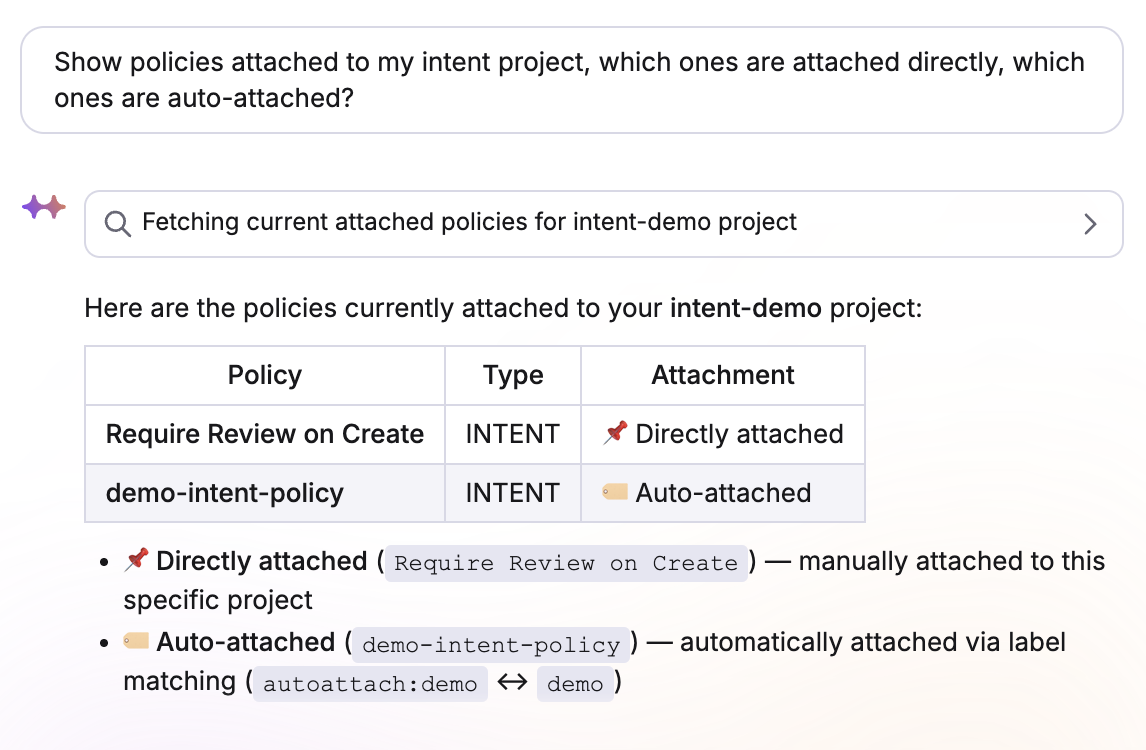
The policy's space determines scope: a policy attaches only to projects whose space sits in the policy's inheritable space chain. Explicit attachments still win — if a policy is both auto-attached and manually attached to the same project, the explicit attachment takes precedence, and the attachment record is no longer marked as auto-attached.
You can inspect which policies are auto-attached vs explicitly attached from the project's Policies tab, or through your MCP client:
Examples»
Allow only specific resource types»
This policy only allows S3 buckets and denies everything else:
1 2 3 4 5 6 7 8 9 10 11 12 13 14 15 16 17 18 19 | |
Deny delete operations»
This policy prevents any resource from being deleted:
1 2 3 4 5 6 7 8 9 10 11 12 13 14 15 16 17 18 19 | |
Restrict operations by provider»
This policy only allows resources from the aws and random providers:
1 2 3 4 5 6 7 8 9 10 11 12 13 14 15 16 17 18 19 20 21 | |
Require tags on resources»
This policy denies creation of S3 buckets without an Environment tag:
1 2 3 4 5 6 7 8 9 10 11 12 13 14 15 16 17 18 19 | |