Spacelift Intelligence»
Spacelift Intelligence is the family of AI-powered features in Spacelift. It lets you provision, manage, and understand your infrastructure in plain language, under the same policies, state management, and audit trail as everything else in the platform.
There are three parts to it:
- Intent: provision and manage infrastructure by describing what you want, straight from your own AI client (Claude Code, Cursor, VS Code, and more). You reach Intent through the Spacelift MCP server.
- Infra Assistant: an AI chat panel built into the Spacelift UI. It answers questions about your infrastructure, summarizes failed runs, and, in Build mode, creates and manages resources through conversation.
- AI integrations: the connection to an LLM provider that powers Infra Assistant. Use the one Spacelift provides, or bring your own.
How it fits together»
The two ways of working share the same toolset. From your editor or terminal you connect the Spacelift MCP server; inside the Spacelift UI you use Infra Assistant. Either one can read your Spacelift account, and either one can provision and manage cloud infrastructure.
When you provision infrastructure, you do it inside an Intent project. A project is the governed container that holds the resources you create, their state, the history of every operation, the policies you attach, and your cloud integrations. Not everything needs a project, though. General API queries and mutations, along with Infra Assistant's UI navigation and doc search, work across your whole account without one. AI integrations are separate again: they're the plumbing that powers the model behind Infra Assistant, and they don't hold any infrastructure themselves.
Here are the two surfaces side by side:
| Spacelift MCP server | Infra Assistant | |
|---|---|---|
| Where you use it | Your own AI client (terminal, editor) | The chat panel in the Spacelift UI |
| What powers the model | Your AI client's model, so you pay for the tokens | An AI integration: the Spacelift-provided budget, or your own BYOM key |
| What it can do | Read your account, and provision and manage infrastructure when you grant write access | Everything the MCP server can do, plus tools specific to the UI |
| Setup | Connect a client to /mcp |
An admin enables it once in Settings; after that, just open the panel |
When they touch infrastructure, both act on the same Intent projects under the same Intent policies.
Which one should I use?
- Working from your editor or terminal? Connect the Spacelift MCP server and use Intent.
- Working inside the Spacelift UI? Use Infra Assistant. It does everything Intent does, and it can also navigate the UI, search the docs, and explain failed runs.
Capabilities at a glance»
The MCP server exposes its capabilities as a set of tools. Which ones you get depends on the OAuth scope you grant when you authenticate:
| Tool | What it does | mcp:read |
mcp:read + mcp:write |
|---|---|---|---|
discover |
Explore the available tools and the Spacelift GraphQL API | ✅ | ✅ |
query |
Run read-only GraphQL queries against your account | ✅ | ✅ |
provider |
Discover Terraform/OpenTofu provider and resource schemas | ✅ | ✅ |
mutate |
Run GraphQL mutations against your account. This is also how you create and manage Intent projects, policies, and cloud integrations. | ❌ | ✅ |
intent |
Create, update, and manage infrastructure resources | ❌ | ✅ |
A read-only session (mcp:read only) can inspect Spacelift and your cloud but can't change anything. discover is always available, and asking for intent automatically turns on provider as well.
The intent tool is a single tool that runs infrastructure-lifecycle operations: create, update, delete, refresh, import, resume, read, and status, plus deploying Spacelift registry modules. Every write is checked against the project's Intent policies before it runs. For the full reference, see Intent.
Infra Assistant wraps those same capabilities in chat and adds a few that only make sense in the UI:
| Capability | Spacelift MCP server | Infra Assistant |
|---|---|---|
| Query your account (read-only) | ✅ | ✅ |
| Discover provider schemas | ✅ | ✅ |
| Create, update, delete, import resources | ✅ (mcp:write) |
✅ (Build mode) |
| Governed by Intent policy | ✅ | ✅ (Build mode) |
| Navigate the Spacelift UI | ❌ | ✅ |
| Search the Spacelift documentation | ❌ | ✅ |
| Summarize and explain failed runs | ❌ | ✅ |
Availability»
| Feature | How you turn it on | Who pays for the tokens |
|---|---|---|
| Intent (via MCP server) | Always available, no toggle. Connect a client and authenticate. | Your own AI client's LLM provider |
| Infra Assistant | An admin enables it in Settings > Spacelift Intelligence | The Spacelift-provided integration (see budget below), or your own BYOM key |
Token budget»
When Infra Assistant runs on the Spacelift-provided AI integration, usage counts against a token budget:
| Plan tier | Budget |
|---|---|
| Free | $10 per 30-day period |
| Paid | Unlimited |
The budget resets in full every 30 days, and a progress indicator in the chat panel shows where you stand. If you run out, set up a Bring Your Own Model integration to keep going.
The budget only applies to the Spacelift-provided integration. BYOM integrations are billed by your provider with no Spacelift-imposed limits, and Intent never touches this budget at all, since your own AI client pays for those tokens.
Enabling Spacelift Intelligence»
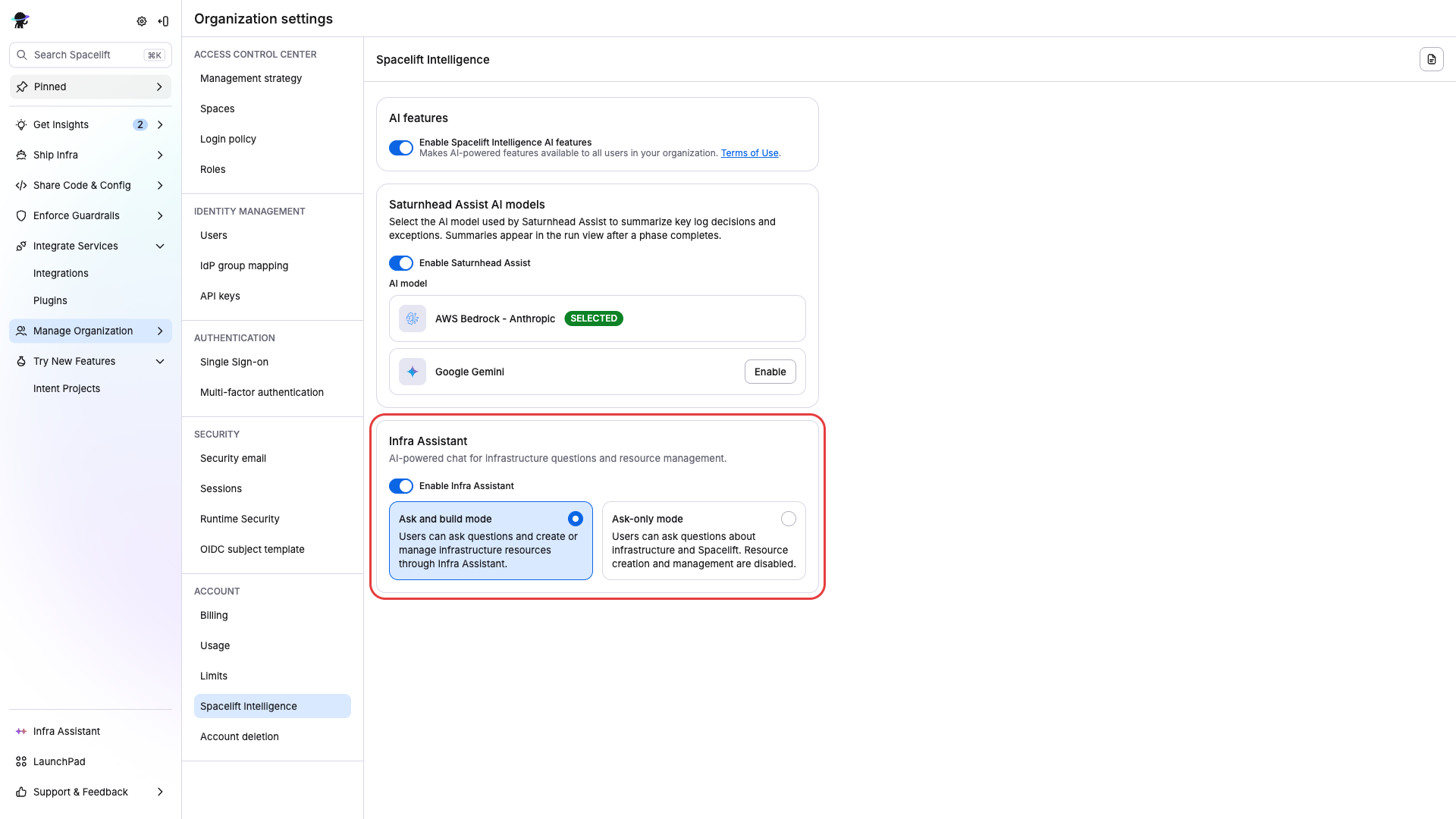
An organization admin needs to turn Infra Assistant on:
- Go to Settings > Spacelift Intelligence.
- Accept the Spacelift Intelligence Terms of Use if this is the first time anyone has enabled a Spacelift Intelligence feature.
- Turn on Enable Spacelift Intelligence AI features.
- Enable Infra Assistant and choose Ask-only mode or Ask and build mode.
Warning
Build mode lets the AI create, modify, and delete infrastructure resources. Make sure you have the right Intent policies in place before you turn it on.
Intent through the MCP server doesn't need this toggle. See Intent to get started.
Learn more»
- Intent: natural-language infrastructure from your own AI client
- Infra Assistant: the in-UI AI chat
- AI integrations: connect an LLM provider
- Spacelift MCP server: how to connect a client and what the tools do
- Intent policy: govern what the AI is allowed to do
- AI Terms of Use