Monthly Event Limits
Every flow has a limit on how many events it can process per calendar month. It protects you from a runaway flow, such as a schedule firing every few seconds or a feedback loop between blocks, generating millions of events before anyone notices.
What counts as an event»
An event is counted every time a block in the flow emits on one of its outputs. That includes trigger events such as incoming HTTP requests and schedule ticks, the outputs of core and app blocks, and events you trigger manually while testing. A single invocation usually produces several events, one per block along the path the event takes.
Usage is counted per flow and resets at the start of each calendar month.
Default limits»
| Limit | Default |
|---|---|
| Events per flow per month | 50,000 |
| Maximum a flow's limit can be raised to | 1,000,000 |
Anyone with the Editor role can raise a single flow's limit up to the organization ceiling. To go beyond the ceiling, contact Spacelift support.
Viewing usage»
Open a flow, click its name in the header, and choose Monthly event limits.
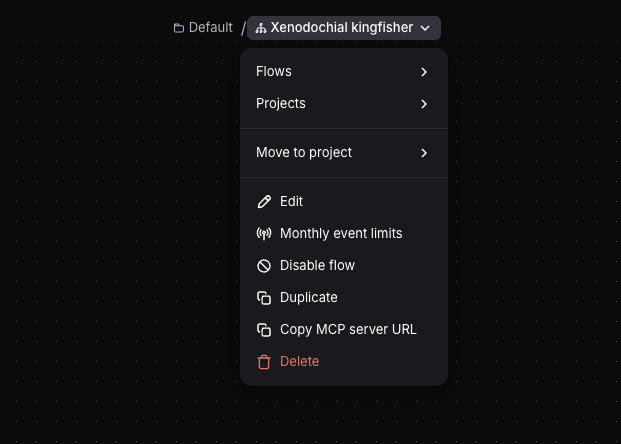
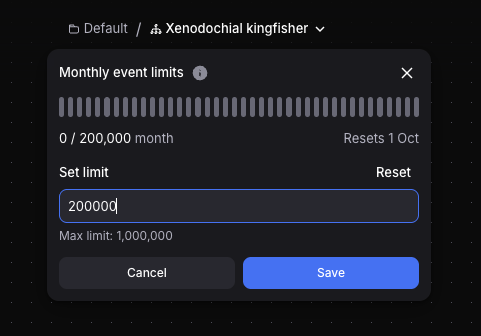
The popover shows how many events the flow has used this month against its limit, and when the counter resets.
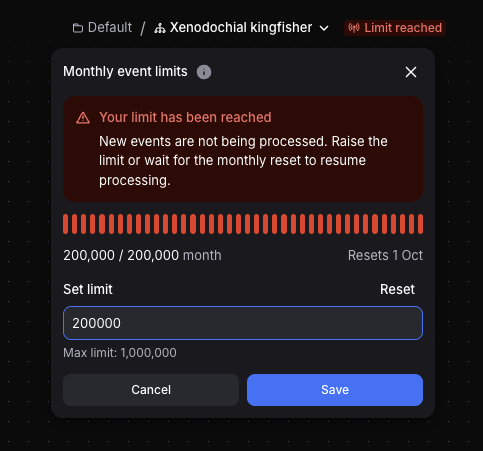
The flow header shows a Limit almost reached badge once usage passes 80% of the limit, and Limit reached once it hits the limit. The same badge appears in the project's flow list.

Changing a flow's limit»
Editors and Admins can set a new limit from the same popover, anywhere between 0 and the organization ceiling. Setting it to 0 stops the flow from processing events until you raise it again. A flow with a custom limit shows a Reset button that returns it to the default.
The limit is stored alongside the flow rather than in its definition, so it is not included in exports and is not managed through flowctl or the Terraform provider. A duplicated flow starts with the default limit.
What happens when the limit is reached»
Once a flow reaches its limit, its blocks stop running for the rest of the month. Events arriving at a block's input are marked as failed, and the invocation shows as failed. The flow itself stays enabled, and incoming trigger events such as HTTP requests are still recorded.
Failed events can be replayed
Nothing is lost when a flow hits its limit. Once you raise the limit or the month rolls over, new events are processed again. Events that failed while the limit was reached are not retried on their own, but you can retry them manually from the block's input events list.