Stack role bindings»
Stacks can receive role bindings to perform operations with elevated permissions, similar to how users, API keys, and IdP groups receive permissions through Spacelift's RBAC system.
Stack role attachments replace the deprecated Administrative flag, providing a more flexible, auditable, and powerful approach to granting stacks elevated permissions.
Why use stack role attachments»
Stack role attachments offer significant advantages over the deprecated administrative flag:
Cross-space access»
Administrative flag limitation: Can only create resources in the stack's own space and subspaces.
Role attachments advantage: Can attach roles to sibling spaces, enabling horizontal access across the space tree. In the example below, a stack in ChildSpace1 can be granted access to ChildSpace2:
graph TD
    A[root] --> B[ChildSpace1]
    A --> C[ChildSpace2]
Fine-grained access control»
Administrative flag limitation: All-or-nothing approach - grants full Space Admin permission with every available permission.
Role attachments advantage: Use custom roles with specific permissions (for example, only context:create and workerpool:create).
This means a stack can create contexts and worker pools, but cannot manage any other resources, such as policies or webhooks.
Enhanced audit trail»
Administrative flag: Basic audit trail with stack actor information.
Role attachments advantage: Audit trail webhooks include role information in the actor_roles field (array of role slugs).
This provides better visibility into what permissions the stack was using when performing actions. See the audit trail documentation for details.
Modern RBAC consistency»
Role attachments align stacks with the broader role-based access model already used by users, IdP groups, and API keys, providing a consistent permission management experience across all actors.
Assign roles to stacks»
Prerequisites»
To attach a role to a stack, you need:
Stack: Managepermission (or Space admin permission as fallback) to the stack's space- Space admin permission to the binding space (the space where the role will be effective)
Why both permissions are required
Creating a role binding that grants permissions to a space effectively allows the stack to act in that space. To prevent privilege escalation, you must have admin access to both spaces: the space where the stack resides and the space where the role will be effective.
Using the Web UI»
- Navigate to the stack's Settings page, then choose Roles on the left
- Click Manage Roles on the top right
- In the sidebar, select the desired role and the target space
- Click Add
Using the Terraform provider»
Use the spacelift_role_attachment resource:
1 2 3 4 5 6 7 8 9 10 11 12 13 14 15 16 17 18 19 20 21 22 23 24 25 26 27 28 29 30 31 | |
- The stack receiving the role attachment.
- The role to attach to the stack.
- The target space: this is where the role will be effective.
In the above scenario, the devops_admin stack will have the Stack creator role effective in the dev space, allowing it to create and manage stacks within that space.
For more information, see the Spacelift Terraform provider documentation.
Permission cascading»
Role attachments follow access propagation: a role attached to a space is effective in that space and in every space beneath it. Attach a role to ParentSpace and it also takes effect in that space's children and grandchildren.
Root space caution
Since the root space is the parent of all spaces, attaching roles to it affects all spaces in your account. Use this with extreme caution and only when necessary.
Root space restriction»
You can only assign a role to the root space if the stack itself is located in the root space. This restriction prevents unintentional access elevation - a stack in a child-of-root space cannot be granted permissions that cascade to all spaces in your account.
If you need a stack in a child space to access resources across multiple spaces, attach roles to specific spaces rather than the root space.
Administrative flag»
The administrative flag is deprecated in favor of role attachments, but it still works and takes precedence over them:
- If
administrative = true, any attached roles will be completely ineffective - You must set
administrative = falsefor role attachments to take effect - This is critical for migration - disable the administrative flag after creating role attachments
See Migration from administrative flag for how to move off the flag.
Policy integration»
Policies can react to stack role attachments through the stack.roles field in policy inputs. This enables policy-based logic based on what roles a stack has attached.
Example: Reject Space Admin role usage»
1 2 3 4 5 6 | |
1 2 3 4 5 6 | |
- Role slug. Use either "Copy Slug" button in the UI or the
spacelift_roledata source to retrieve it.
Multiple roles»
Stacks can have multiple role bindings:
- Different roles in different spaces for varied access levels
- Multiple roles in the same space (permissions are additive)
- Combinations of Space Admin in own space and Reader in other spaces
Example: Multiple role attachments»
1 2 3 4 5 6 7 8 9 10 11 12 13 | |
External state access»
External state access allows you to read the state of a stack from outside authorized runs and tasks. See the documentation here for further details.
In order for your stack to access another stack's OpenTofu/Terraform state, the stack needs the Stack: Read stack state and Stack: Download stack state actions on the target stack's space. This can be achieved by attaching a role with those actions to the stack for the target stack's space.
Example:
1 2 3 4 5 6 7 8 9 10 11 12 13 14 15 16 17 18 19 | |
Note
The Space writer and Space admin roles also include Stack: Read stack state and Stack: Download stack state.
Migration from administrative flag»
The administrative flag is deprecated in favor of role attachments, but it still works and there's no cutover date: nothing breaks if you keep using it. Migrating to a Space Admin role attachment is recommended to unlock the advantages role attachments offer (cross-space access, fine-grained permissions, and a richer audit trail) and to align stacks with the rest of the RBAC model.
Because the flag takes precedence over role attachments, migration is a two-step process: attach the role first, then disable the flag.
Note
The Space Admin role is a built-in system role, so you don't need to create it manually, it already exists in your Spacelift account.
Step-by-step migration guide»
1. Identify stacks with administrative flag»
List all stacks with administrative = true in your account. You can do this through the Spacelift UI (by filtering on the stacks page) or by searching your OpenTofu/Terraform code for the administrative attribute.
2. For each stack, create role attachment»
Attach the Space Admin role to the stack using the stack's own space as the binding space:
1 2 3 4 5 6 7 8 9 | |
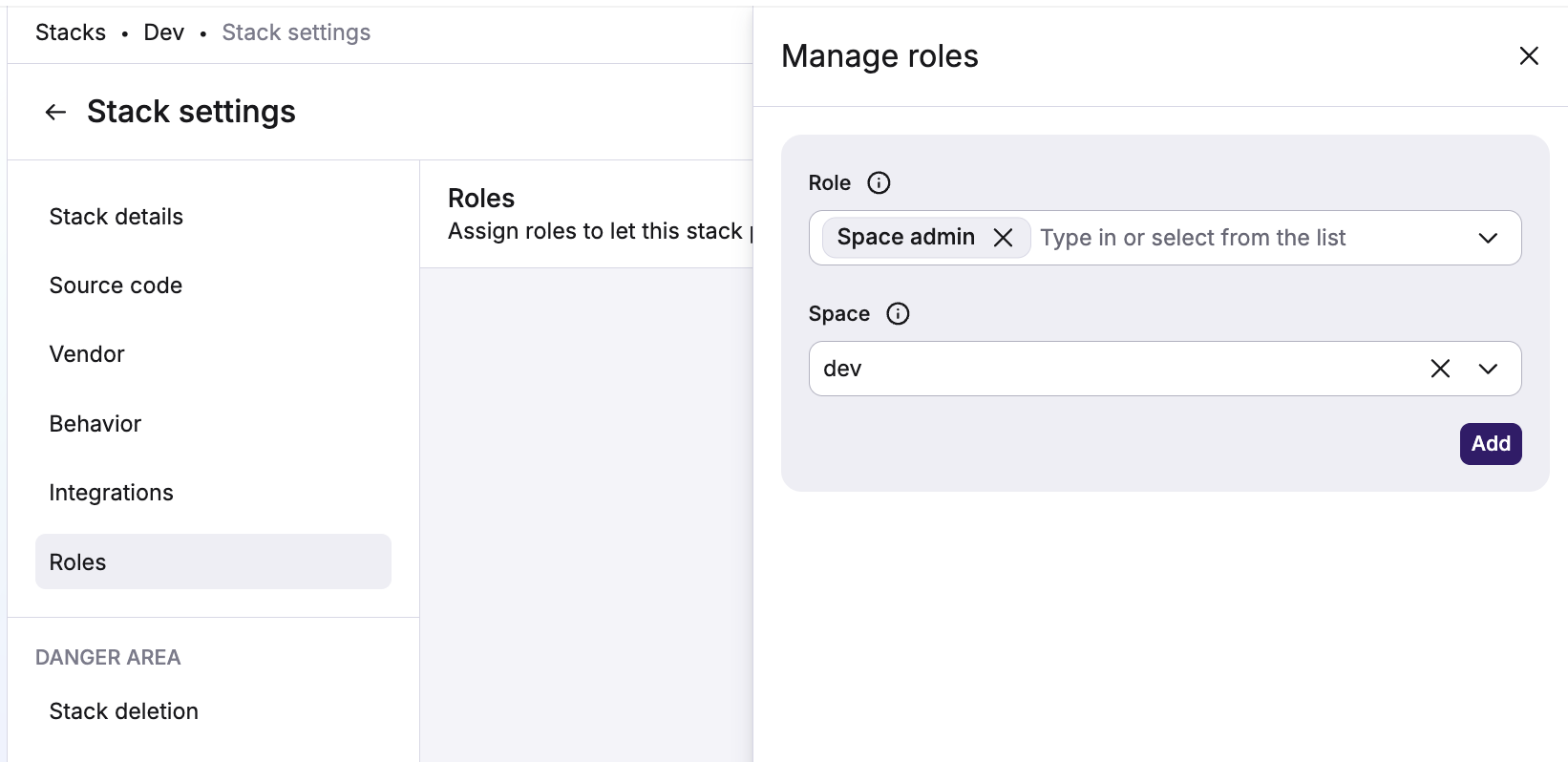
- Navigate to the stack's Settings page, then choose Roles.
- Click Manage Roles on the top right.
- In the drawer, select the Space admin role and the stack's own space as the target.
- Click Add.
Assuming your stack is in the dev space, the role attachment will grant Space admin permissions in the dev space:
3. Remove the administrative attribute»
Once you've verified the role has been attached, remove the administrative attribute:
1 2 3 4 | |
Warning
The administrative flag takes precedence over role attachments. While administrative = true, the attached role is ignored. You must either set administrative = false, or remove the attribute entirely (recommended) for the role attachment to take effect.
4. Verify the role attachment»
After disabling the flag, verify that the stack can perform the same operations as before. Trigger a tracked run and ensure it succeeds.
Rollback procedure»
If you need to roll back during migration:
- Set
administrative = trueagain - The administrative flag takes precedence, so role attachments will be ignored
- Test that everything works as before
- You can leave the role attachments in place and try migration again later
Adjust policies if necessary»
If any of your policies reference the stack.administrative field, update them to use the stack.roles field instead. For example:
1 2 3 4 5 6 7 8 9 10 11 | |
1 2 3 4 5 6 7 8 9 10 11 | |
- Role slug. Use either "Copy Slug" button in the UI or the
spacelift_roledata source to retrieve it.
Edge cases»
Stack moving between spaces»
When a stack moves to a different space, existing role bindings remain unchanged. This is intentional and important for Terraform provider stability.
If you want to update role bindings after moving a stack, you need to explicitly modify the role attachments.